What’s Around ships today as a complete rebuild — native speed, native maps, sharper UX, same core idea: see what is interesting at your location, instantly.
What the app does
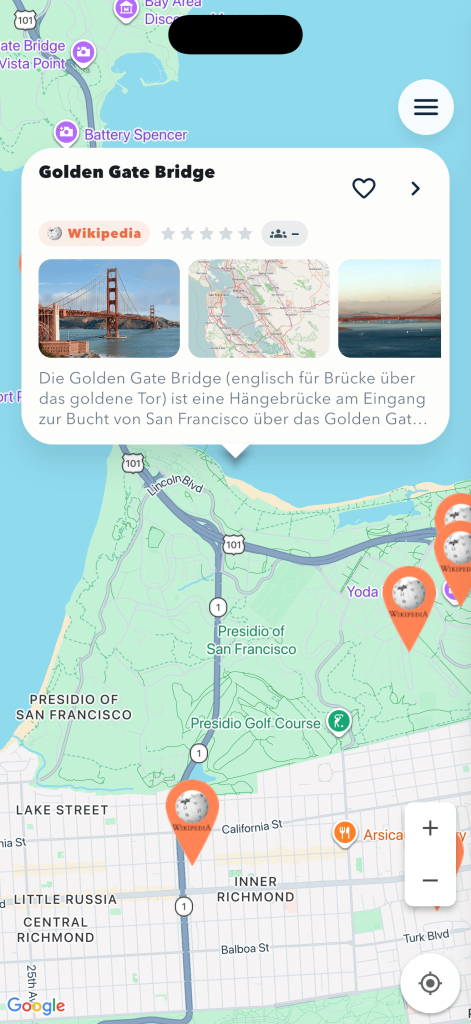
Open the app, it centres on your location and drops markers for everything worth a look:
- Landmarks from Wikipedia
- Travel highlights from Wikivoyage
- Filming locations from movies and TV series
Tap a marker, and an overlay appears with the title, an image carousel, the rating, and a Wikipedia preview. Tap the chevron and the detail screen opens full-screen with a hero gallery, the long description, and a direct link to the source.
What changed this time
The old version had aged badly — maps too slow, images too small, filters confusing. This one is rebuilt from scratch in Flutter, with clear architecture and a UX that respects your time:
- Native maps on both platforms (Google Maps SDK), with proper cluster bubbles instead of marker soup at low zoom.
- High-resolution images straight from the Wikimedia sources, full-screen on the detail page.
- Search-as-I-move as an optional toggle — off by default so panning stays calm; tap “Search this area” when you actually want to refresh.
- Persistent cache — regions you visited once load instantly the second time, even offline.
- Optional sign-in via Apple, Google or Facebook — only needed for saving favorites and submitting ratings.
Privacy first
The app does not require sign-in to browse. Location data does not leave the device unless it has to: it is used only to centre the search around you. Sign-in via Apple, Google or Facebook works without us seeing the password — the providers hand us a token which we verify against their servers.
Ads are served via Google AdMob, placed sparingly between detail views, with a cooldown so it never gets in the way. In the EU we ask for ad consent (Google UMP) before the first ad loads; if you decline, you get non-personalised ads instead.
Deleting your account is one tap from inside the app — Menu → Sign out → “Delete account”. That removes favorites, ratings and the user record from our server.
Where to get it
What’s Around is available on the Apple App Store and Google Play. Free, ad-supported. No in-app purchases, no premium tier — what you need is included.
Roadmap
Next up: native ads instead of full-screen interstitials (less friction for you, same revenue for us), a dedicated list view for favorites, more images per entry.
Send feedback, ideas and wishes directly to contact. Bug reports are most useful with the exact region and language — you can find the build version in the menu at the bottom.